



Sales Basics
• 8 min readSales Email Examples: Templates and Formats That Get Replies
Published June 19, 2026
Published June 19, 2026
Most sales teams don't struggle because they aren't sending enough emails. They struggle because they're sending the same templates everyone else is using.
As inboxes become more crowded, buyers have become harder to impress. Generic outreach no longer works, and response rates continue to fall. The good news? High-performing teams still book meetings consistently by using the right sales email examples and formats.
In this guide, we'll break down proven sales email templates, real-world examples, and the frameworks modern revenue teams use to turn cold outreach into conversations.
Before diving into specific email format examples, let's establish the structural principles every high-converting sales email shares — regardless of stage, persona, or channel.
Subject Line: One Job Only
The subject line's only job is to get the email opened. It doesn't sell. It doesn't explain. It creates enough curiosity or relevance that the reader thinks "that's about me."
Best-performing subject lines are:
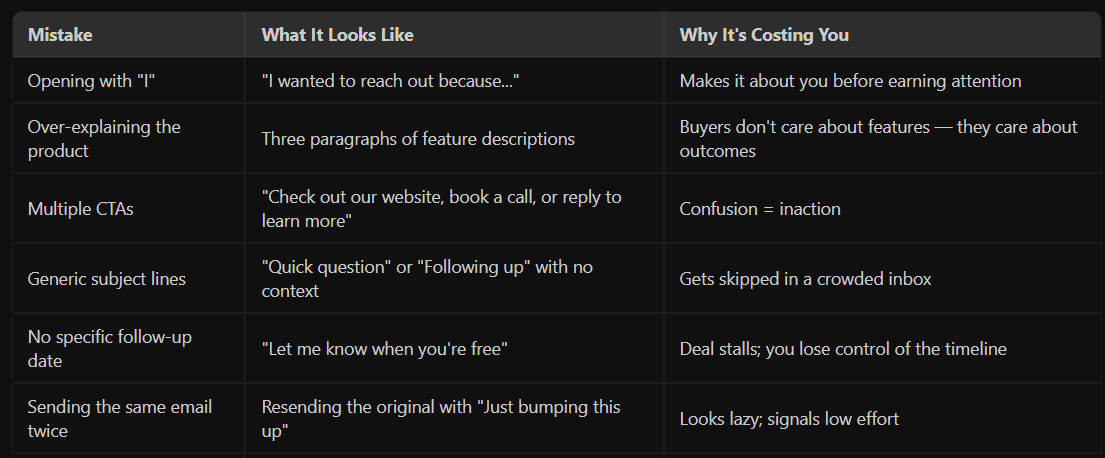
The first sentence needs to earn the rest of the email. The fastest way to lose a reader is to open with something generic, self-referential, or vague.
The best opening lines in any sample email do one of three things:
The most common email format mistake in B2B sales is trying to say too much. Every sentence that doesn't serve the email's single purpose is a sentence that dilutes it.
Great email examples focus on one pain point, one outcome, and one call to action.
The CTA should ask for the smallest possible commitment that still moves the conversation forward. "Would you be open to a quick 15-minute call this week or next?" is better than "Let me know if you're interested in learning more about our platform."
One CTA. One ask. Always.
These aren't generic email template examples pulled from a database. Each one is built on a specific scenario, with annotations explaining why each element works.
Use case: Prospect recently got promoted or their company just raised a funding round.
Subject: Congrats on the Series B — quick thought on scaling the sales team
Body:
Hey [First Name],
Saw the funding announcement — congrats to the team.
Usually when companies at [Company]'s stage close a Series B, the next 90 days are all about scaling pipeline fast. That puts a lot of pressure on the SDR team to hit the ground running.
One thing we've helped companies like [Peer Company] do post-funding is get new reps ramped and running personalized sequences in under a week — without the usual tool sprawl.
Worth a quick chat to see if there's a fit?
Why this works:
Use case: Prospect's company recently added or changed a tool that signals buying intent.
Subject: Noticed you're using [Tool] — thought this might be useful
Body:
Hi [First Name],
Spotted that [Company] recently integrated [Tool]. Teams using [Tool] often hit a wall when it comes to [specific limitation — e.g., "tracking which sequences are actually converting vs. just running"].
We've helped a few companies in [Industry] bridge that exact gap — without adding another disconnected layer to the stack.
If it's a challenge you're working through, happy to share what's worked. Even a short email exchange might be worth it.
Why this works:
Use case: Second or third touch after no response to the first email.
Subject: Re: [Original Subject] — different angle
Body:
[First Name],
Figured I'd try a different angle since the last one didn't land.
I'm not sure if [problem area] is even on your radar right now — which is fair. But if your SDR team is spending time on [manual task — e.g., "sorting through bounced sequences or manually logging call outcomes"], that's usually where I see the most time disappear.
If it's not a priority, no problem at all. Just let me know and I'll stop cluttering your inbox.
Why this works:
Use case: Prospect showed interest 3+ months ago, then disappeared.
Subject: Still worth a conversation?
Body:
Hi [First Name],
We spoke briefly back in [Month] about [topic they expressed interest in]. I don't want to assume it's still relevant — a lot changes in a quarter.
If the timing was just off, I'd love to reconnect and see if anything's shifted. And if priorities have changed completely, just say the word and I'll close this out on our end.
Why this works:
Use case: Asking a happy customer or connection for a warm introduction.
Subject: Quick ask — know anyone at [Target Company]?
Body:
Hi [First Name],
Hope things are going well at [their company].
I've been trying to get in front of the sales ops team at [Target Company] — based on what they're building, I think there's a real fit. Wondering if you happen to know anyone there who might be worth connecting with?
No pressure at all if not — just figured it was worth asking before going the cold route.
Why this works:
Use case: Following up after a demo with a champion who needs to get internal buy-in.
Subject: Quick recap + what I'd tell your CRO
Body:
Hi [First Name],
Really enjoyed the conversation — I think [specific thing they said] is exactly the kind of challenge we're built for.
Attached is a quick one-pager your team can use internally. The three things I'd highlight:
I'll follow up [specific date]. In the meantime, is there anything I can prepare to make the internal conversation easier?
Why this works:
Every email format sends a signal beyond the words themselves.
Long paragraphs signal: I didn't respect your time enough to edit.
Formal language in casual contexts signals: I'm reading from a script.
Vague subject lines signal: This is mass outreach.
Heavy formatting (bold every sentence, multiple headers in a cold email) signals: I'm a template.
The best email format examples for B2B sales look like they were written by a thoughtful human to a specific person. Because they were — or at minimum, they were personalized enough to feel that way. One or two short paragraphs. Clean layout. A subject line that sounds like it came from a colleague, not a campaign.
When buyers scan their inbox, they're pattern-matching for danger signals within milliseconds. Your job is to not trigger those signals — before they even read a word.
Real personalization in a sales email format is not the same as merge tags.
Here's the framework high-performing teams use:
Level 1 — Basic (Lowest Impact): First name, company name, job title. This is table stakes. Every tool does this. Buyers are completely immune to it.
Level 2 — Contextual: References something observable — a funding event, a LinkedIn post, a job posting, a product launch, a tech stack signal. This takes 2–3 minutes per email but drives significantly higher open and reply rates.
Level 3 — Operational: References something about how they work — a specific process, a team structure, a challenge unique to their stage of growth. This is harder to scale but converts at 3–4x the rate of Level 1 emails.
Level 4 — Peer-Referenced: Name-drops a company or person in their world that they'd recognize and respect. Not a testimonial. A peer reference. "We work with the sales team at [Peer Company] — they had the exact same setup before they switched."
Most email examples that underperform are stuck at Level 1. Most that win are operating at Level 2 or 3.
The tactical implication: don't send 200 Level 1 emails. Send 50 Level 2 emails. You'll get more replies from 50 than you would from 200.
When your SDRs don't have visibility into what the prospect engaged with, they can't personalize intelligently. When they can't see which email examples are generating replies vs. which ones are generating unsubscribes, they can't improve. When every rep is on a different tool with different templates in different spreadsheets, there's no institutional memory — and no compounding learning.
Outplay is built around this problem. Rather than giving you a library of static email templates for sales and calling it done, Outplay gives your team a live view of what's performing — which sequences are generating conversations, which subject lines are getting opens, which email formats are booking meetings. Your team doesn't just get sample emails to copy. They get the intelligence to know why something worked and how to replicate it.
Because the difference between a 2% reply rate and a 12% reply rate usually isn't a better template. It's a smarter system behind the template.
Ready to see how Outplay helps your team run smarter email sequences, and turn your best-performing email examples into team-wide playbooks? See Outplay in action →
Share
Subscribe to the Outplay blog for your dose of expert contributions, tried and tested techniques and so much more.

