



Sales Basics
• 6 min readiOS Call Screening: How to Beat Apple's Caller Screen and Live Voicemail
Published July 8, 2026
Published July 8, 2026
Cold calling has changed—and most sales teams haven't noticed.
You dial a prospect, reach voicemail, and begin your usual message. Halfway through, they suddenly answer the call. They weren't unavailable—they were reading your voicemail in real time through Apple's iOS Call Screening and Live Voicemail.
With iPhone call screening, buyers can decide whether to answer before you even finish speaking. That means outdated voicemail scripts and generic cold calls are easier than ever to ignore.
For modern sales teams, success isn't just about making more calls—it's about adapting to how buyers now receive them. In this guide, we'll explain how iOS Call Screening works, why it impacts cold calling, and the strategies you can use to stay ahead.
To beat the system, you have to understand the technology.
Introduced in late 2023 with iOS 17, Apple rolled out a feature called "Live Voicemail." When a user receives a call from an unknown number and sends it to voicemail (or lets it ring out), the iPhone call screen doesn't just go dark.
Instead, the lock screen lights up with a live, real-time transcription of what the caller is saying.
As the SDR speaks, the words appear on the prospect's screen. At any point during this live transcription, the prospect has two options:
This call screener iPhone feature is turned on by default for most users. Because the vast majority of B2B buyers use iPhones, this effectively means that a massive portion of your total addressable market is now reading your voicemails rather than listening to them.
To understand why your voicemails are failing, you have to put yourself in the buyer's shoes and understand how to screen calls on iPhone.
Imagine you are a VP of Sales. You are in the middle of a Slack conversation when an unknown number calls.
You hit the side button to silence the ringer. The call goes to voicemail. Your phone sits on your desk, face up.
Suddenly, text starts appearing on your lock screen: “Hi John, this is Sarah from XYZ Corp. I'm calling because we help companies like yours optimize their synergistic revenue workflows to synergize...”
You don't need to hear Sarah's tone. You don't need to hear her confidence. You see the corporate buzzwords, you recognize the generic pitch, and you swipe left to delete and block.
The iOS call screening feature removes the human element of voice and reduces your pitch to cold, hard text. If that text doesn't immediately signal relevance, the prospect will not pick up.
If prospects are reading your voicemails live, you have to stop leaving voicemails and start leaving “Live Pitches.”
You have approximately three to four seconds (about 10 to 15 words) to capture their attention on the iPhone caller screen before they look away or hit block.
Here is how you structure a Live Pitch.
1. The Contextual Opener
Do not start with "Hi, my name is X and I work for Y." It takes up too much screen real estate. Start with the context of why you are calling.
Instead of: "Hi Sarah, this is Mike from Outplay calling."
Say: "Sarah, noticed your team is hiring three new SDRs this week."
When that sentence transcribes on the screen, it proves immediate relevance. It's not a generic blast; it's about them.
2. The Direct Value
Next, state the exact problem you solve, directly tied to the context you just gave.
Say: "Most teams struggle to ramp new hires fast without their outbound pipeline dipping."
3. The "Pick Up" CTA
This is the most crucial change for the ios call screening era. Because you know they might be watching the screen, you can invite them to pick up the phone right now.
Say: "If you're near your phone, I can explain how we fix that in 30 seconds. If not, I'll follow up via email."
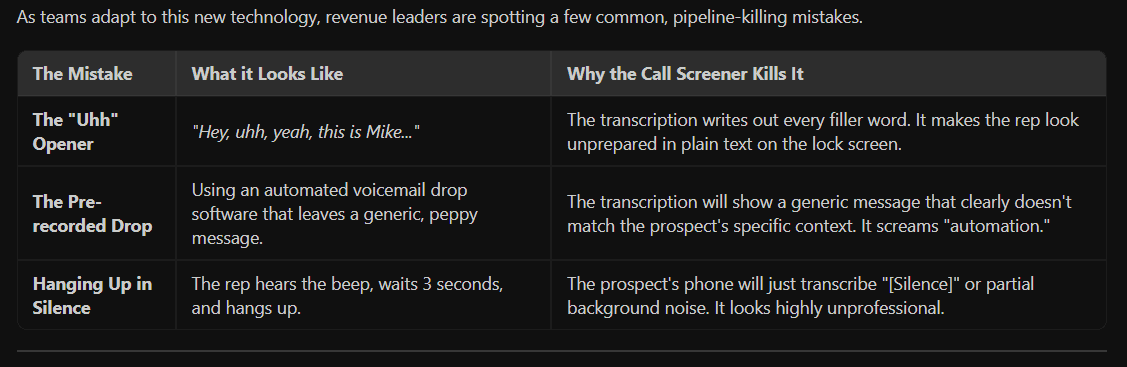
Here is how modern revenue teams are orchestrating their outbound to win, even when the buyer is screening.
1. Local Presence Matters More Than Ever
Before a prospect can use the call screener iPhone feature, they have to decide to let it go to voicemail. If you are calling from a toll-free number or an out-of-state area code they don't recognize, they are likely to decline the call immediately, bypassing the live voicemail entirely. Utilizing localized dialing presence increases the initial connection rate.
2. Multi-Channel Orchestration
The voicemail is no longer a standalone touchpoint. It is the trailer for the movie (the email). When an SDR leaves a highly contextual Live Pitch that gets transcribed on the prospect's screen, the immediate next step must be an email that references that exact call. "Hey John - just left a voicemail about your new SDR hires..." The prospect has already read the transcription. The email capitalizes on that micro-awareness. If your tools don't allow reps to seamlessly execute a call, leave a tailored voicemail, and instantly fire off a contextual email from the same interface, you are losing momentum.
3. Training for the Transcription
Sales managers need to start pulling voicemail recordings and reading the transcripts. You aren't just coaching for tone and energy anymore; you are coaching for readability. Does the first sentence of the voicemail read well as a text message? If not, the script needs to be rewritten.
Is your sales team struggling to break through the noise? Discover how Outplay’s smarter revenue platform gives your reps the context, multi-channel workflows. Explore Outplay Today →
Share
Subscribe to the Outplay blog for your dose of expert contributions, tried and tested techniques and so much more.

